Editing your organization's profile: Difference between revisions
Jump to navigation
Jump to search
Drew Jackson (talk | contribs) m 7 revisions: Pages for site cutover, part 21 |
Drew Jackson (talk | contribs) No edit summary |
||
| Line 12: | Line 12: | ||
<br /> | <br /> | ||
{{ | {{Clicklaw Website Contributor Guide Navbox|type=guide}} | ||
<noinclude>__NOGLOSSARY__</noinclude> | |||
Revision as of 17:21, 1 April 2013
An organization profile contains information about your organization that Clicklaw visitors will see.
- Log in as a Clicklaw contributor.
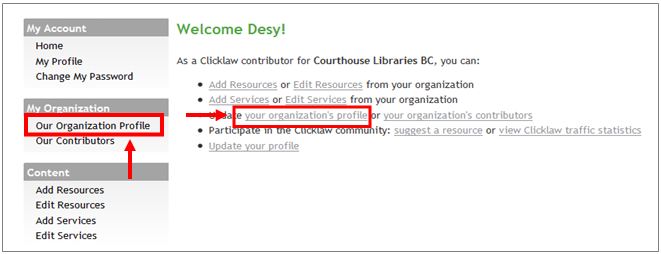
- Click “your organization’s profile” if you’re on the contributor homepage or click “Our organization profile” in the left menu of the contributor site.
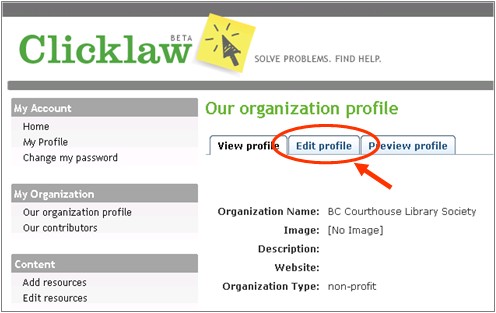
- Click the Edit profile tab.
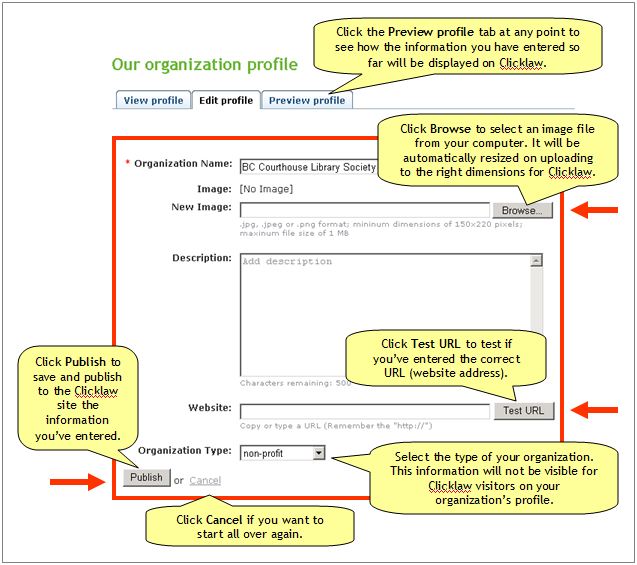
- Enter all the required information and click the Publish button when you’re done.
Template:Tipsbox for Clicklaw Wiki
| ||||||||||||||||||||||||||||||||||